Raycaster with PixiJS and Collisions
Here's how I implemented my Raycasting system with PixiJS:
by jonathan.lepage
11/11/2018
Image by: jonathan.lepage
ECSGAMEDEVMATHPIXIJSTS
Implementing a Raycaster in PixiJS with Vertex Collision Detection#
Introduction#
A significant challenge I undertook: implementing a crucial feature for proper collision management in my game engine.Unlike most game engines that use vectors,
PixiJS only handles bounds as rectangular projections.While this isn't problematic in 2D, this approach remains very limited for game development needs.
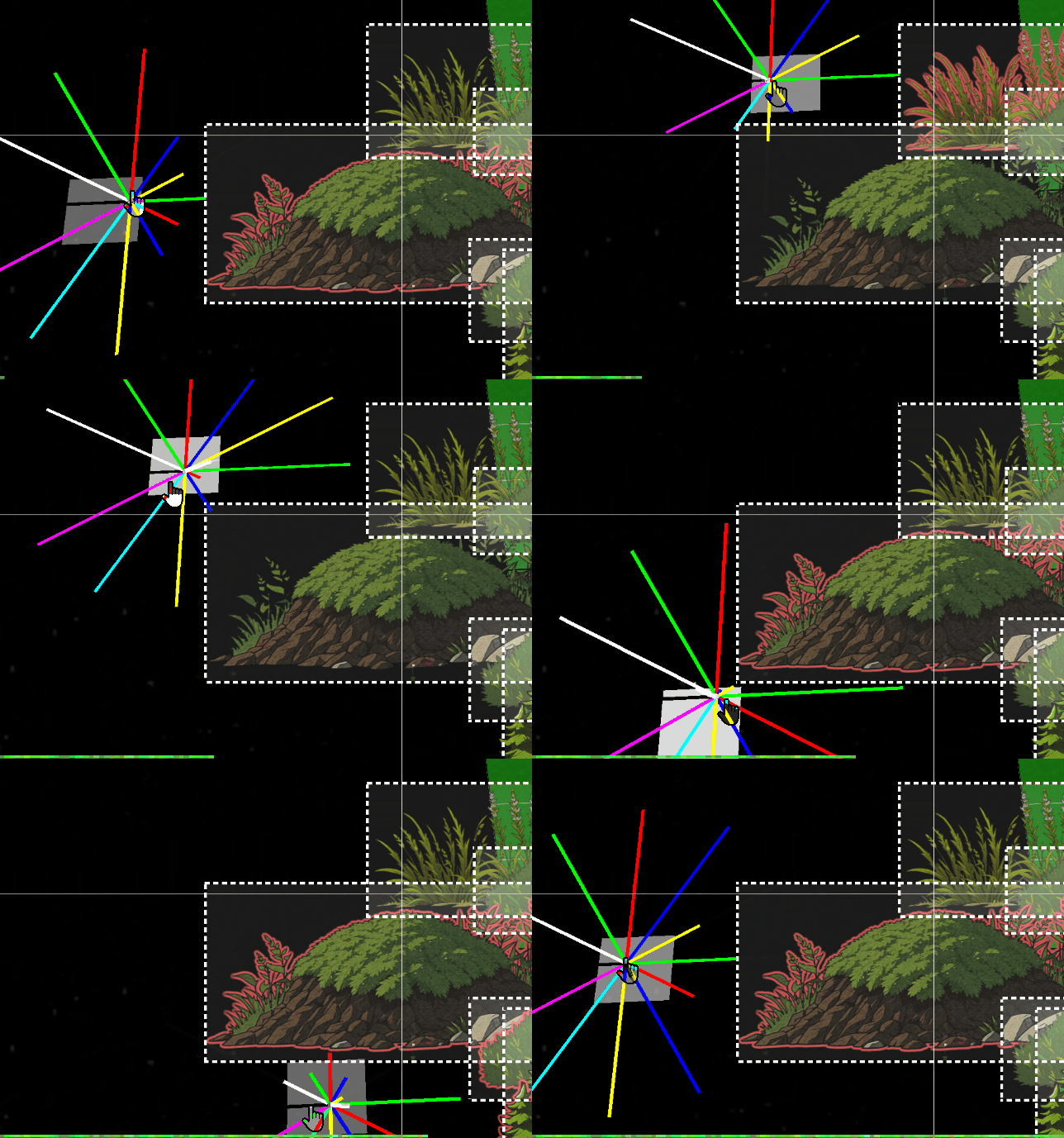
The image above illustrates the behaviour of a
raycast on our objects' bounds.The problem#
However, in 3D, this approach poses a significant problem.When a
DisplayObject undergoes rotation, its bounds remains a simple static rectangle.Here's an example:#
I therefore had to dedicate several days to studying mathematics and trigonometry to implement this feature.
This feature will be essential for an actor to perceive their environment and interact with objects based on their distance and height.
This
raycast will also serve the FOW (Fog of War) system, displaying certain portions of the map and elements based on the collisions it detects.This is a topic I only briefly touch upon, as it is very complex.
Nevertheless, I hope this article can inspire you for your own project.
Integrations#
To simplify my approach, I created a 'Class Helper' within my architecture.These 'Class Helper's are stored in `.h.ts` files and exclusively export
Pixi objects.tsexport class RayCasterHelper extends Container3d { public rays:Sprite3d[] = []; public raysVirtual:Graphics[] = []; public raysDistance:number[] = []; public boundsDebugs:Graphics[] = []; public raysTextDistance:Text3d[] = []; public rayLength:number = 900; public raySize:number = 12; public inCircleRadius:number = 10; public quadrans:number = 8; public shapes:CollisionShape[] = []; }
The initialization builds the number of segments indicated in the parameter.
In my case, an 8-segment quadrant proved more than sufficient.
This configuration also facilitates debugging, as it allows assigning 8 distinct colors to these segments.
tspublic initialize( renderer:Renderer ) {
		this.clear();
		const colors = [0x00ff00, 0xff0000, 0x0000ff, 0xffff00, 0x00ffff, 0xff00ff, 0x333444, 0xffffff];
		for ( let i = 0, l = this.quadrans; i < l; i++ ) {
			const color = colors[i % colors.length];
			const edges = [
				new Point( this.inCircleRadius, 0 ),
				new Point( this.inCircleRadius + this.rayLength, 0 ),
			];
			const ray = new Graphics();
			ray.lineStyle( this.raySize, color, 1 );
			ray.moveTo( this.inCircleRadius, 1 );
			ray.drawPolygon( edges );
			ray.endFill();

			const raySprite = new Sprite3d( renderer.generateTexture( ray ) );
			this.rays.push( raySprite );
			this.shapes[i] = new CollisionShape( raySprite, edges );

			raySprite.proj.euler.z = ( Math.PI * 2 / this.quadrans ) * i;
			this.raysDistance.push( 0 );
It's worth noting the creation of points that serve as segments.
Normally, only diagonal points would be necessary, as a rectangle doesn't have blind spots on its horizontal and vertical axes.
It's therefore possible to ignore them based on the quadrant percentage, which allows skipping vertical and horizontal rays to generate polygons only on the diagonals.
tsfor ( let i = 0, l = this.quadrans; i < l; i++ ) {
			const color = colors[i % colors.length];

			// continue if is horizontal or vertical
			if( i % 2 === 0 ) continue;
			const edges = [...
Next comes the
intersect method, which only accepts DisplayObjects as parameters.All
DisplayObjects that the raycast will iterate over are provided to it.tspublic intersects( worlds:Container3d[] ) { const { rays, quadrans, intersectedMap, intersectedObjectsMap, closestMap } = this; intersectedMap.clear(); intersectedObjectsMap.clear(); closestMap.clear(); for ( let i = 0, l = quadrans; i < l; i++ ) { const ray = rays[i]; const b1 = ray.getBounds( true, this._cacheRectangle1 ); for ( const object of worlds ) { const b2 = object.getBounds( true, this._cacheRectangle2 ); const intersect = intersects( b1, b2 ); if ( intersect ) { const rayshape = this.shapes[i]; if ( rayshape.intersectsShape( b2 ) ) { intersectedMap.set( i, ( intersectedMap.get( i ) ?? [] ).concat( object ) ); intersectedObjectsMap.set( object, ( intersectedObjectsMap.get( object ) ?? [] ).concat( i ) ); } } } }
I also had to adapt a
PixiJS function to detect intersections and collect additional data.The code is presented below; it does not differ significantly from the original method.
ts/** return the intersection between two rectangles if any */
function intersects( source:Rectangle, other:Rectangle ) {
	let x0_1 = source.x < other.x ? other.x : source.x;
	let x1_1 = source.right > other.right ? other.right : source.right;
	if ( x1_1 <= x0_1 ) {
		return null;
	}
	let y0_1 = source.y < other.y ? other.y : source.y;
	let y1_1 = source.bottom > other.bottom ? other.bottom : source.bottom;
	if ( y1_1 <= y0_1 ) {
		return null;
	}

	// Compute the intersection distance
	const dx = x0_1 - x1_1;
	const dy = y0_1 - y1_1;
	const distance = Math.sqrt( dx * dx + dy * dy );

	// Return the intersection details
	return {
		x: x0_1,
		y: y0_1,
		x2: x1_1,
		width: x1_1 - x0_1,
		height: y1_1 - y0_1,
		distance: distance,
		inRatioXY: Math.abs( dx / dy ),
	};
}
Finally, once
Pixi has detected intersections between two objects, it's possible to refine the local detection to check if our diagonal segments touch the objects.Optimization Memo:#
Environment objects use classic squarebounds.Indeed, with several thousand entities, collision detection based on all segments without an optimized structure would lead to very serious performance problems.
It would probably be better to use 'web workers' or
shaders to optimize this type of calculation, rather than having the CPU manage it.This is why only the diagonals of the
raycaster DisplayObject will handle polygonal collision detection, thus offering a 50% gain in precision.To achieve 100% precision, environment objects would also need to be polygons, which is not essential for my current engine.
With the exception, perhaps, of diagonal fences, which could potentially pose a problem...
time will tell.
This
IntersectsShape method will therefore need to iterate over each vertex point to check if these points are located inside the bounds of the DisplayObjects.tsintersectsShape( rec:Rectangle ) { const edges = this.edges; for ( let i = 0; i < edges.length; i++ ) { const edge = edges[i]; const point = edge.intersectsRectangle( rec ); if ( point ) { return true; } } return false; } class Segment { public p1: Point; public p2: Point; constructor( p1 = new Point(), p2 = new Point() ) { this.p1 = p1; this.p2 = p2; } intersects( edge: Segment, asSegment = true, point = new Point() ) { const a = this.p1; const b = this.p2; const e = edge.p1; const f = edge.p2; const a1 = b.y - a.y; const a2 = f.y - e.y; const b1 = a.x - b.x; const b2 = e.x - f.x; const c1 = ( b.x * a.y ) - ( a.x * b.y ); const c2 = ( f.x * e.y ) - ( e.x * f.y ); const denom = ( a1 * b2 ) - ( a2 * b1 ); if ( denom === 0 ) { return null; } point.x = ( ( b1 * c2 ) - ( b2 * c1 ) ) / denom; point.y = ( ( a2 * c1 ) - ( a1 * c2 ) ) / denom; if ( asSegment ) { const uc = ( ( f.y - e.y ) * ( b.x - a.x ) - ( f.x - e.x ) * ( b.y - a.y ) ); const ua = ( ( ( f.x - e.x ) * ( a.y - e.y ) ) - ( f.y - e.y ) * ( a.x - e.x ) ) / uc; const ub = ( ( ( b.x - a.x ) * ( a.y - e.y ) ) - ( ( b.y - a.y ) * ( a.x - e.x ) ) ) / uc; if ( ua >= 0 && ua <= 1 && ub >= 0 && ub <= 1 ) { return point; } else { return null; } } return point; } intersectsRectangle( rect: Rectangle ) { const rectEdges = [ //TODO: will need optimize with a cache pool of points new Segment( new Point( rect.left, rect.top ), new Point( rect.right, rect.top ) ), new Segment( new Point( rect.right, rect.top ), new Point( rect.right, rect.bottom ) ), new Segment( new Point( rect.right, rect.bottom ), new Point( rect.left, rect.bottom ) ), new Segment( new Point( rect.left, rect.bottom ), new Point( rect.left, rect.top ) ) ]; for ( const rectEdge of rectEdges ) { if ( this.intersects( rectEdge, true ) ) { return true; } } return false; } }
Final Render#
The
segmentIntersects method is where the most complex calculations are performed.It took me two days of intense work to make it functional, but the result is very satisfying.
As can be seen in this
gif, I can now interact with my environment and associate tags and information with it thanks to Raycasting.This simple tool offers multiple interesting features to leverage.