PixiJS 光线投射与碰撞检测
以下是我使用 PixiJS 实现我的 Raycasting 系统的方法:
par jonathan.lepage
2018/11/11
由: jonathan.lepage
ECSGAMEDEVMATHPIXIJSTS
在PixiJS中实现光线投射器及顶点碰撞检测#
简介#
我面临的一个巨大挑战是:在我的游戏引擎中实现一个对良好碰撞管理至关重要的功能。与大多数使用矢量的游戏引擎不同,
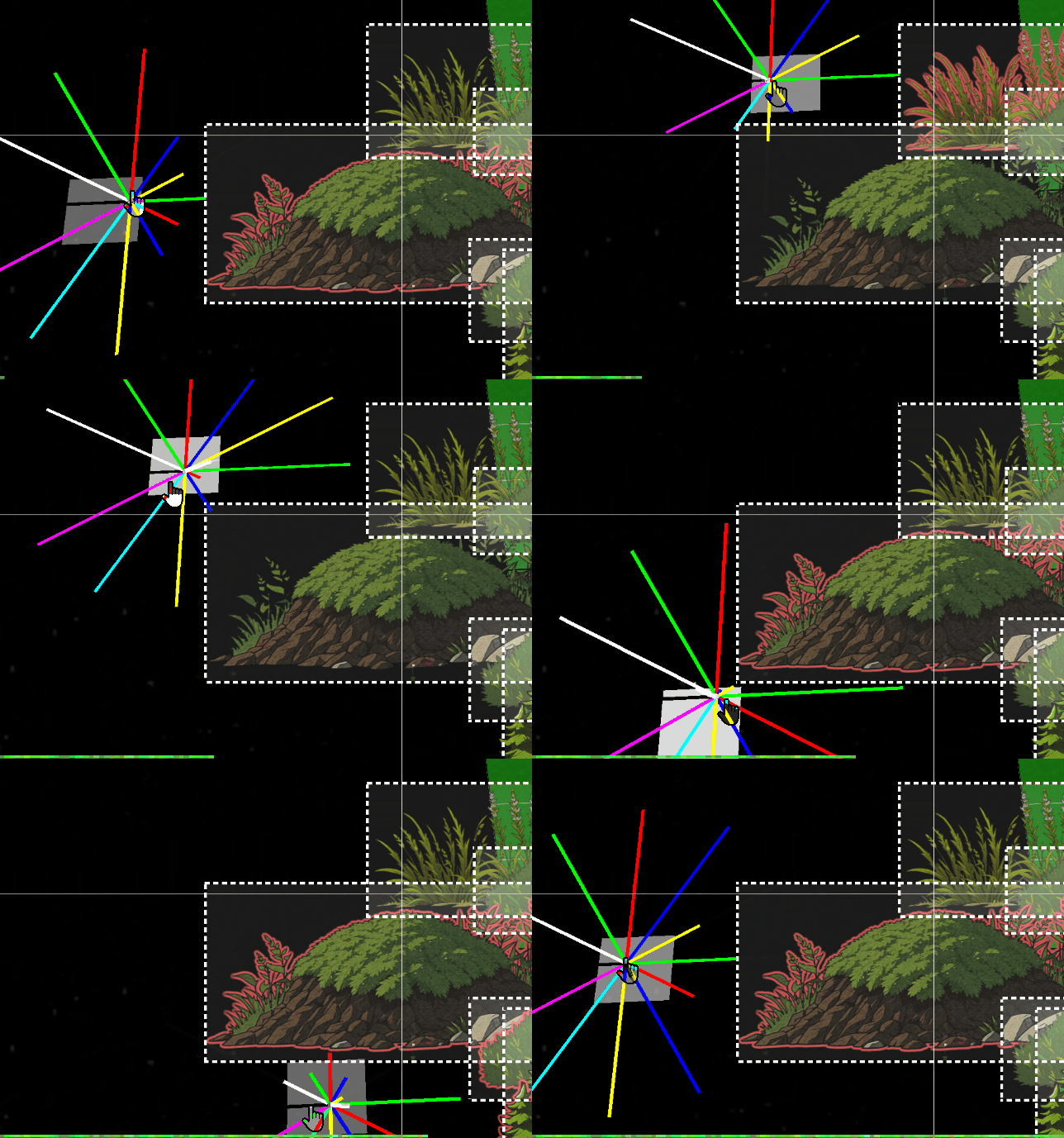
PixiJS 只以矩形投影的形式处理 bounds。虽然这在 2D 中不是问题,但这种方法对于游戏的需求来说仍然非常有限。上图展示了光线投射在我们的对象 bounds 上的行为。问题#
然而,在 3D 中,这种方法带来了重大问题。当一个DisplayObject 发生旋转时,它的 bounds 仍然是一个简单的静态矩形。这是一个例子:#
因此,我不得不花费数天时间研究数学和三角学,以实现此功能。
此功能对于角色感知其环境并根据物体的距离和高度与之互动至关重要。这种
raycast 也将用于 FOW(战争迷雾)系统,根据检测到的碰撞来显示地图的某些部分和元素。这是一个我只做简要介绍的主题,因为它非常复杂。但我仍希望这篇文章能为你的项目提供一些启发。
集成#
为了简化我的方法,我在我的架构中创建了一个Class Helper。这些 Class Helper 存储在 `.h.ts` 文件中,并且只导出 Pixi 对象。tsexport class RayCasterHelper extends Container3d { public rays:Sprite3d[] = []; public raysVirtual:Graphics[] = []; public raysDistance:number[] = []; public boundsDebugs:Graphics[] = []; public raysTextDistance:Text3d[] = []; public rayLength:number = 900; public raySize:number = 12; public inCircleRadius:number = 10; public quadrans:number = 8; public shapes:CollisionShape[] = []; }
初始化会根据参数构建指定数量的线段。在我的案例中,一个包含 8 个线段的象限已经绰绰有余。这种配置也便于调试,因为它允许为这些线段分配 8 种不同的颜色。
tspublic initialize( renderer:Renderer ) {
		this.clear();
		const colors = [0x00ff00, 0xff0000, 0x0000ff, 0xffff00, 0x00ffff, 0xff00ff, 0x333444, 0xffffff];
		for ( let i = 0, l = this.quadrans; i < l; i++ ) {
			const color = colors[i % colors.length];
			const edges = [
				new Point( this.inCircleRadius, 0 ),
				new Point( this.inCircleRadius + this.rayLength, 0 ),
			];
			const ray = new Graphics();
			ray.lineStyle( this.raySize, color, 1 );
			ray.moveTo( this.inCircleRadius, 1 );
			ray.drawPolygon( edges );
			ray.endFill();

			const raySprite = new Sprite3d( renderer.generateTexture( ray ) );
			this.rays.push( raySprite );
			this.shapes[i] = new CollisionShape( raySprite, edges );

			raySprite.proj.euler.z = ( Math.PI * 2 / this.quadrans ) * i;
			this.raysDistance.push( 0 );
值得注意的是,这些作为线段的点是如何创建的。通常,只需要对角线上的点,因为矩形在其水平和垂直轴上没有盲点。因此,可以根据象限的百分比来忽略它们,从而跳过垂直和水平射线,仅在对角线上生成多边形。
tsfor ( let i = 0, l = this.quadrans; i < l; i++ ) {
			const color = colors[i % colors.length];

			// continue if is horizontal or vertical
			if( i % 2 === 0 ) continue;
			const edges = [...
接下来是
intersect 方法,它只接受 DisplayObject 作为参数。我们向它提供所有 raycast 需要迭代的 DisplayObject。tspublic intersects( worlds:Container3d[] ) { const { rays, quadrans, intersectedMap, intersectedObjectsMap, closestMap } = this; intersectedMap.clear(); intersectedObjectsMap.clear(); closestMap.clear(); for ( let i = 0, l = quadrans; i < l; i++ ) { const ray = rays[i]; const b1 = ray.getBounds( true, this._cacheRectangle1 ); for ( const object of worlds ) { const b2 = object.getBounds( true, this._cacheRectangle2 ); const intersect = intersects( b1, b2 ); if ( intersect ) { const rayshape = this.shapes[i]; if ( rayshape.intersectsShape( b2 ) ) { intersectedMap.set( i, ( intersectedMap.get( i ) ?? [] ).concat( object ) ); intersectedObjectsMap.set( object, ( intersectedObjectsMap.get( object ) ?? [] ).concat( i ) ); } } } }
我还需要调整
PixiJS 的一个函数,以检测交点并收集额外数据。代码如下所示,它与原始方法没有显著差异。ts/** return the intersection between two rectangles if any */ function intersects( source:Rectangle, other:Rectangle ) { let x0_1 = source.x < other.x ? other.x : source.x; let x1_1 = source.right > other.right ? other.right : source.right; if ( x1_1 <= x0_1 ) { return null; } let y0_1 = source.y < other.y ? other.y : source.y; let y1_1 = source.bottom > other.bottom ? other.bottom : source.bottom; if ( y1_1 <= y0_1 ) { return null; } // Compute the intersection distance const dx = x0_1 - x1_1; const dy = y0_1 - y1_1; const distance = Math.sqrt( dx * dx + dy * dy ); // Return the intersection details return { x: x0_1, y: y0_1, x2: x1_1, width: x1_1 - x0_1, height: y1_1 - y0_1, distance: distance, inRatioXY: Math.abs( dx / dy ), }; }
最后,一旦
Pixi 检测到两个对象之间的交点,就可以细化局部检测,以检查我们的对角线段是否触及对象。优化备忘:#
环境中的对象使用经典的方形bounds。事实上,如果实体数量达到数千个,没有优化结构的基于所有线段的碰撞检测将导致非常严重的性能问题。最好使用 web workers 或 shaders 来优化这类计算,而不是让 CPU 来处理。这就是为什么只有
DisplayObject raycaster 的对角线会处理多边形碰撞检测,从而提供 50% 的精度提升。为了达到 100% 的精度,环境中的对象也需要是多边形,这对于我当前的引擎来说不是必需的。也许除了对角线围栏,它们可能会带来问题……时间会告诉我们答案。因此,这个
IntersectsShape 方法需要遍历 vertex 的每个点,以检查这些点是否位于 DisplayObject 的 bounds 内部。tsintersectsShape( rec:Rectangle ) { const edges = this.edges; for ( let i = 0; i < edges.length; i++ ) { const edge = edges[i]; const point = edge.intersectsRectangle( rec ); if ( point ) { return true; } } return false; } class Segment { public p1: Point; public p2: Point; constructor( p1 = new Point(), p2 = new Point() ) { this.p1 = p1; this.p2 = p2; } intersects( edge: Segment, asSegment = true, point = new Point() ) { const a = this.p1; const b = this.p2; const e = edge.p1; const f = edge.p2; const a1 = b.y - a.y; const a2 = f.y - e.y; const b1 = a.x - b.x; const b2 = e.x - f.x; const c1 = ( b.x * a.y ) - ( a.x * b.y ); const c2 = ( f.x * e.y ) - ( e.x * f.y ); const denom = ( a1 * b2 ) - ( a2 * b1 ); if ( denom === 0 ) { return null; } point.x = ( ( b1 * c2 ) - ( b2 * c1 ) ) / denom; point.y = ( ( a2 * c1 ) - ( a1 * c2 ) ) / denom; if ( asSegment ) { const uc = ( ( f.y - e.y ) * ( b.x - a.x ) - ( f.x - e.x ) * ( b.y - a.y ) ); const ua = ( ( ( f.x - e.x ) * ( a.y - e.y ) ) - ( f.y - e.y ) * ( a.x - e.x ) ) / uc; const ub = ( ( ( b.x - a.x ) * ( a.y - e.y ) ) - ( ( b.y - a.y ) * ( a.x - e.x ) ) ) / uc; if ( ua >= 0 && ua <= 1 && ub >= 0 && ub <= 1 ) { return point; } else { return null; } } return point; } intersectsRectangle( rect: Rectangle ) { const rectEdges = [ //TODO: will need optimize with a cache pool of points new Segment( new Point( rect.left, rect.top ), new Point( rect.right, rect.top ) ), new Segment( new Point( rect.right, rect.top ), new Point( rect.right, rect.bottom ) ), new Segment( new Point( rect.right, rect.bottom ), new Point( rect.left, rect.bottom ) ), new Segment( new Point( rect.left, rect.bottom ), new Point( rect.left, rect.top ) ) ]; for ( const rectEdge of rectEdges ) { if ( this.intersects( rectEdge, true ) ) { return true; } } return false; } }
最终渲染#
segmentIntersects 方法是进行最复杂计算的地方。我花了两个日夜的紧张工作才使其正常运行,但结果非常令人满意。正如在这个 gif 中可以看到的,我现在可以与我的环境互动,并通过 Raycasting 为其关联标签和信息。这个简单的工具提供了多种有趣的、可利用的功能。