PixiJS와 충돌 감지 레이캐스터
PixiJS로 레이캐스팅 시스템을 구현한 방법은 다음과 같습니다.
그럼: jonathan.lepage
2018. 11. 11.
이미지 제공: jonathan.lepage
ECSGAMEDEVMATHPIXIJSTS
'PixiJS'에서 'Vertex' 충돌 감지를 이용한 Raycaster 구현#
소개#
제가 도전했던 큰 과제는: 제 게임 엔진에서 충돌을 효과적으로 관리하는 데 필수적인 기능을 구현하는 것이었습니다.대부분의 게임 엔진이 벡터를 사용하는 것과 달리,
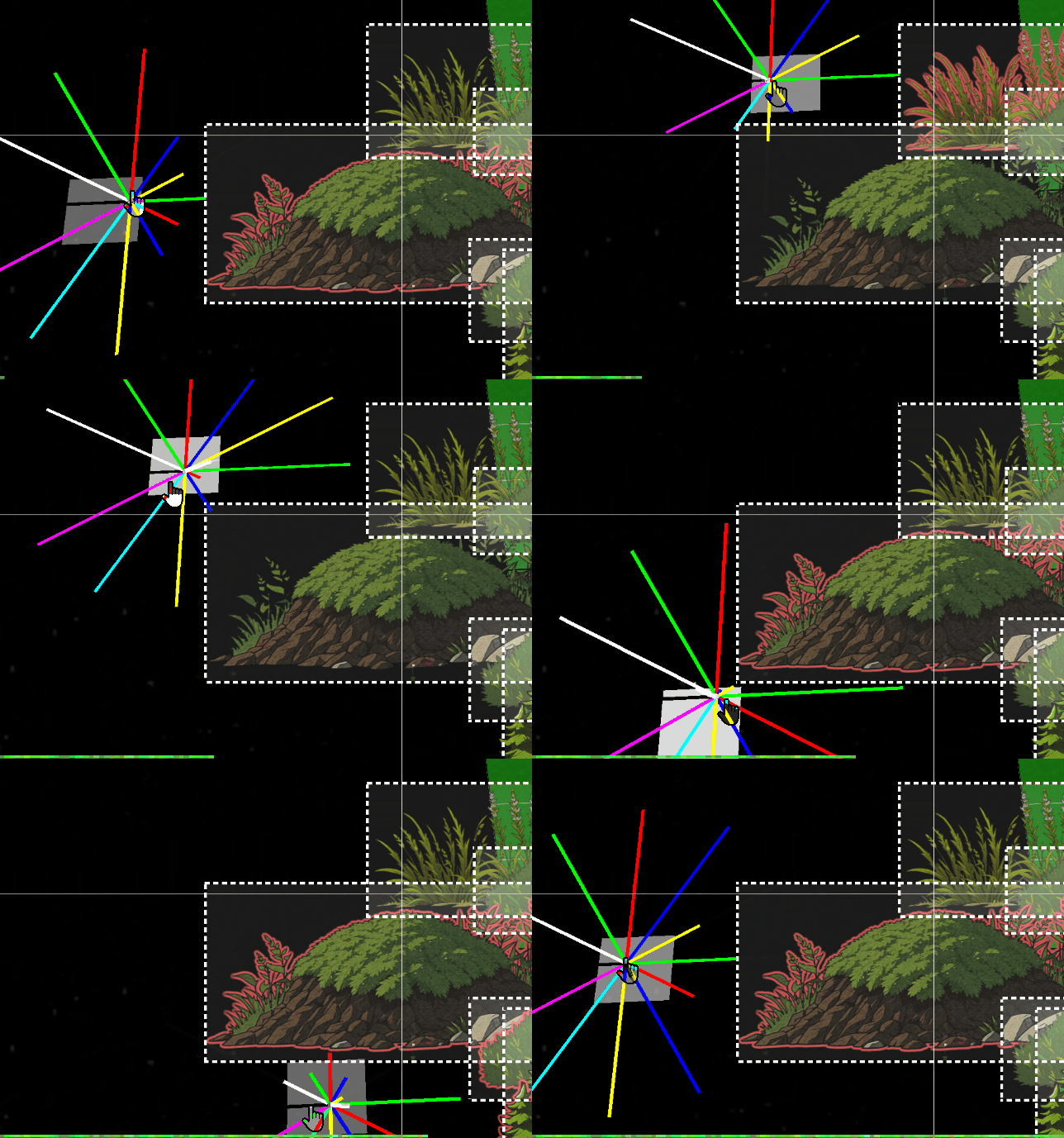
PixiJS는 직사각형 투영 형태의 bounds만 처리합니다. 이는 2D에서는 문제가 되지 않지만, 게임의 요구사항에는 매우 제한적입니다. 위 이미지는 우리 객체의 bounds에 대한 raycast의 동작을 보여줍니다.문제점#
하지만 3D에서는 이 접근 방식이 심각한 문제를 야기합니다.DisplayObject가 회전할 때, 그 bounds는 단순히 정적인 직사각형으로 유지됩니다.여기 예시가 있습니다:#
따라서 이 기능을 구현하기 위해 수일 동안 수학과 삼각법을 연구해야 했습니다.
이 기능은 플레이어가 주변 환경을 인지하고 객체와 거리 및 높이에 따라 상호작용하는 데 필수적일 것입니다. 이
raycast는 또한 감지하는 충돌에 따라 지도의 특정 부분과 요소를 표시하는 FOW (Fog of War) 시스템에도 사용될 것입니다.이것은 매우 복잡한 주제이기 때문에 저는 간략하게만 다룹니다. 그럼에도 불구하고 이 글이 여러분의 프로젝트에 영감을 줄 수 있기를 바랍니다.
통합#
제 접근 방식을 단순화하기 위해 아키텍처 내에Class Helper를 만들었습니다. 이 Class Helper는 `.h.ts` 파일에 저장되며, 전적으로 Pixi 객체를 내보냅니다.tsexport class RayCasterHelper extends Container3d { public rays:Sprite3d[] = []; public raysVirtual:Graphics[] = []; public raysDistance:number[] = []; public boundsDebugs:Graphics[] = []; public raysTextDistance:Text3d[] = []; public rayLength:number = 900; public raySize:number = 12; public inCircleRadius:number = 10; public quadrans:number = 8; public shapes:CollisionShape[] = []; }
초기화는 매개변수로 지정된 세그먼트 수를 구축합니다. 제 경우, 8개의 세그먼트로 구성된 사분면은 충분하고도 남았습니다. 이 구성은 각 세그먼트에 8가지 다른 색상을 할당할 수 있어 디버깅을 용이하게 합니다.
tspublic initialize( renderer:Renderer ) {
		this.clear();
		const colors = [0x00ff00, 0xff0000, 0x0000ff, 0xffff00, 0x00ffff, 0xff00ff, 0x333444, 0xffffff];
		for ( let i = 0, l = this.quadrans; i < l; i++ ) {
			const color = colors[i % colors.length];
			const edges = [
				new Point( this.inCircleRadius, 0 ),
				new Point( this.inCircleRadius + this.rayLength, 0 ),
			];
			const ray = new Graphics();
			ray.lineStyle( this.raySize, color, 1 );
			ray.moveTo( this.inCircleRadius, 1 );
			ray.drawPolygon( edges );
			ray.endFill();

			const raySprite = new Sprite3d( renderer.generateTexture( ray ) );
			this.rays.push( raySprite );
			this.shapes[i] = new CollisionShape( raySprite, edges );

			raySprite.proj.euler.z = ( Math.PI * 2 / this.quadrans ) * i;
			this.raysDistance.push( 0 );
세그먼트 역할을 하는 점들의 생성에 주목해야 합니다. 일반적으로 직사각형은 수평 및 수직 축에 사각지대가 없기 때문에 대각선상의 점들만 필요할 것입니다. 따라서 사분면의 비율에 따라 이 점들을 무시할 수 있으며, 이는 수직 및 수평 광선을 건너뛰고 대각선에만 다각형을 생성하는 것을 가능하게 합니다.
tsfor ( let i = 0, l = this.quadrans; i < l; i++ ) {
			const color = colors[i % colors.length];

			// continue if is horizontal or vertical
			if( i % 2 === 0 ) continue;
			const edges = [...
다음으로 매개변수로
DisplayObject만 받는 intersect 메서드가 나옵니다. raycast가 반복해야 할 모든 DisplayObject를 이 메서드에 제공합니다.tspublic intersects( worlds:Container3d[] ) { const { rays, quadrans, intersectedMap, intersectedObjectsMap, closestMap } = this; intersectedMap.clear(); intersectedObjectsMap.clear(); closestMap.clear(); for ( let i = 0, l = quadrans; i < l; i++ ) { const ray = rays[i]; const b1 = ray.getBounds( true, this._cacheRectangle1 ); for ( const object of worlds ) { const b2 = object.getBounds( true, this._cacheRectangle2 ); const intersect = intersects( b1, b2 ); if ( intersect ) { const rayshape = this.shapes[i]; if ( rayshape.intersectsShape( b2 ) ) { intersectedMap.set( i, ( intersectedMap.get( i ) ?? [] ).concat( object ) ); intersectedObjectsMap.set( object, ( intersectedObjectsMap.get( object ) ?? [] ).concat( i ) ); } } } }
교차점을 감지하고 추가 데이터를 수집하기 위해
PixiJS의 함수를 조정해야 했습니다. 아래에 코드가 제시되어 있으며, 원본 메서드와 크게 다르지 않습니다.ts/** return the intersection between two rectangles if any */ function intersects( source:Rectangle, other:Rectangle ) { let x0_1 = source.x < other.x ? other.x : source.x; let x1_1 = source.right > other.right ? other.right : source.right; if ( x1_1 <= x0_1 ) { return null; } let y0_1 = source.y < other.y ? other.y : source.y; let y1_1 = source.bottom > other.bottom ? other.bottom : source.bottom; if ( y1_1 <= y0_1 ) { return null; } // Compute the intersection distance const dx = x0_1 - x1_1; const dy = y0_1 - y1_1; const distance = Math.sqrt( dx * dx + dy * dy ); // Return the intersection details return { x: x0_1, y: y0_1, x2: x1_1, width: x1_1 - x0_1, height: y1_1 - y0_1, distance: distance, inRatioXY: Math.abs( dx / dy ), }; }
마지막으로,
Pixi가 두 객체 사이의 교차점을 감지한 후에는, 우리의 대각선 세그먼트가 객체에 닿는지 확인하기 위해 로컬 감지를 정교화할 수 있습니다.최적화 메모:#
환경 객체들은 일반적인 사각형bounds를 사용합니다. 실제로 수천 개의 엔티티를 사용할 경우, 최적화된 구조 없이 모든 세그먼트에 기반한 충돌 감지는 매우 심각한 성능 문제를 야기할 것입니다. 이러한 유형의 계산을 최적화하기 위해 CPU가 처리하도록 하는 것보다 web workers 또는 shaders를 사용하는 것이 더 나을 것입니다.이것이
DisplayObject raycaster의 대각선만이 다각형 충돌 감지를 처리하여 50%의 정밀도 향상을 제공하는 이유입니다.100%의 정밀도를 얻으려면 환경 객체도 다각형이어야 하지만, 이는 현재 제 엔진에 필수적인 것은 아닙니다. 대각선 울타리는 잠재적으로 문제가 될 수 있지만... 미래가 말해줄 것입니다.
따라서 이
IntersectsShape 메서드는 vertex의 각 점을 반복하여 이 점들이 DisplayObject의 bounds 내부에 있는지 확인해야 합니다.tsintersectsShape( rec:Rectangle ) { const edges = this.edges; for ( let i = 0; i < edges.length; i++ ) { const edge = edges[i]; const point = edge.intersectsRectangle( rec ); if ( point ) { return true; } } return false; } class Segment { public p1: Point; public p2: Point; constructor( p1 = new Point(), p2 = new Point() ) { this.p1 = p1; this.p2 = p2; } intersects( edge: Segment, asSegment = true, point = new Point() ) { const a = this.p1; const b = this.p2; const e = edge.p1; const f = edge.p2; const a1 = b.y - a.y; const a2 = f.y - e.y; const b1 = a.x - b.x; const b2 = e.x - f.x; const c1 = ( b.x * a.y ) - ( a.x * b.y ); const c2 = ( f.x * e.y ) - ( e.x * f.y ); const denom = ( a1 * b2 ) - ( a2 * b1 ); if ( denom === 0 ) { return null; } point.x = ( ( b1 * c2 ) - ( b2 * c1 ) ) / denom; point.y = ( ( a2 * c1 ) - ( a1 * c2 ) ) / denom; if ( asSegment ) { const uc = ( ( f.y - e.y ) * ( b.x - a.x ) - ( f.x - e.x ) * ( b.y - a.y ) ); const ua = ( ( ( f.x - e.x ) * ( a.y - e.y ) ) - ( f.y - e.y ) * ( a.x - e.x ) ) / uc; const ub = ( ( ( b.x - a.x ) * ( a.y - e.y ) ) - ( ( b.y - a.y ) * ( a.x - e.x ) ) ) / uc; if ( ua >= 0 && ua <= 1 && ub >= 0 && ub <= 1 ) { return point; } else { return null; } } return point; } intersectsRectangle( rect: Rectangle ) { const rectEdges = [ //TODO: will need optimize with a cache pool of points new Segment( new Point( rect.left, rect.top ), new Point( rect.right, rect.top ) ), new Segment( new Point( rect.right, rect.top ), new Point( rect.right, rect.bottom ) ), new Segment( new Point( rect.right, rect.bottom ), new Point( rect.left, rect.bottom ) ), new Segment( new Point( rect.left, rect.bottom ), new Point( rect.left, rect.top ) ) ]; for ( const rectEdge of rectEdges ) { if ( this.intersects( rectEdge, true ) ) { return true; } } return false; } }
최종 결과#
segmentIntersects 메서드는 가장 복잡한 계산이 이루어지는 부분입니다. 이것을 작동시키기 위해 이틀간 집중적인 작업을 해야 했지만, 그 결과는 매우 만족스럽습니다. 이 gif에서 볼 수 있듯이, 이제 Raycasting을 통해 제 환경과 상호작용하고 태그 및 정보를 연결할 수 있습니다.이 간단한 도구는 활용할 수 있는 다양한 흥미로운 기능을 제공합니다.