PixiJS でのレイキャスターと衝突検出
PixiJSを使ったRaycastingシステムを私がどのように実装したか、ご紹介します。
による jonathan.lepage
2018/11/11
画像提供: jonathan.lepage
ECSGAMEDEVMATHPIXIJSTS
PixiJSでのレイキャスター実装と「頂点」衝突検出#
はじめに#
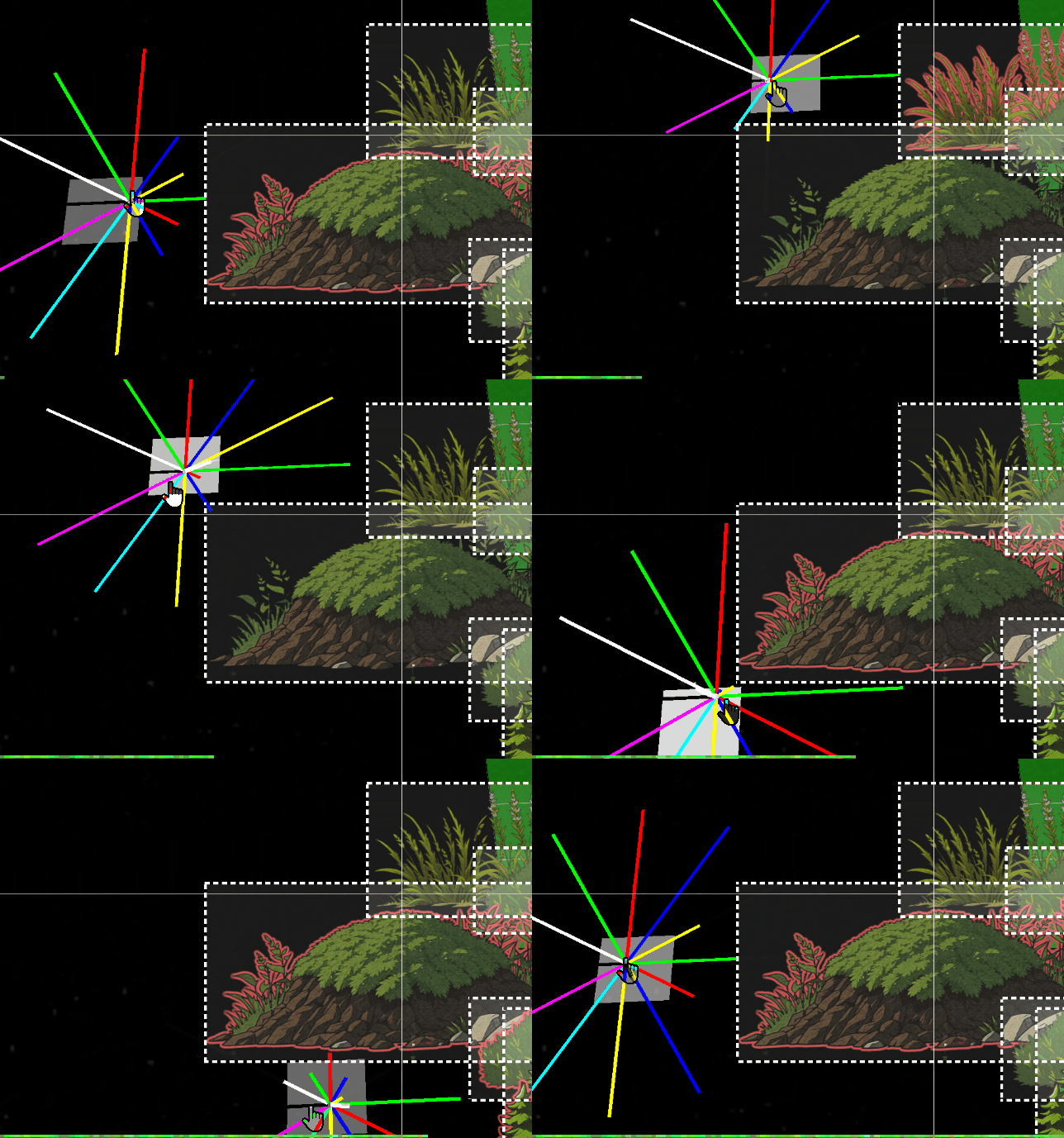
私が挑戦した大きな課題の一つは、ゲームエンジンにおける衝突管理の鍵となる機能を実装することでした。ほとんどのゲームエンジンがベクトルを使用するのとは異なり、PixiJSは「境界」(bounds)を矩形の投影としてのみ扱います。2Dでは問題ありませんが、このアプローチはゲームのニーズに対して非常に限定的です。上記の画像は、オブジェクトの境界に対するレイキャストの挙動を示しています。
問題点#
しかし、3Dでは、このアプローチは重大な問題を引き起こします。DisplayObjectが回転すると、その「境界」(bounds)は単なる静的な長方形のままです。例をご覧ください:#
そのため、この機能を実装するために、数学と三角法を数日間かけて研究する必要がありました。
この機能は、アクターが周囲を認識し、オブジェクトとの距離や高さに応じてインタラクトするために不可欠です。このレイキャストは、FOW(Fog of War)システムにも利用され、検出された衝突に基づいてマップの一部や要素を表示します。
これは非常に複雑なため、ここでは簡単にしか触れていません。それでも、この記事が皆さんのプロジェクトにインスピレーションを与えることを願っています。
統合#
アプローチを簡素化するため、私はアーキテクチャ内に「Class Helper」を作成しました。これらのClass Helperは`.h.ts`ファイルに保存され、Pixiオブジェクトのみをエクスポートします。tsexport class RayCasterHelper extends Container3d { public rays:Sprite3d[] = []; public raysVirtual:Graphics[] = []; public raysDistance:number[] = []; public boundsDebugs:Graphics[] = []; public raysTextDistance:Text3d[] = []; public rayLength:number = 900; public raySize:number = 12; public inCircleRadius:number = 10; public quadrans:number = 8; public shapes:CollisionShape[] = []; }
初期化では、パラメータで指定されたセグメントの数を構築します。私の場合、8セグメントのクアドラントで十分すぎるほどでした。この構成は、各セグメントに8つの異なる色を割り当てられるため、デバッグも容易になります。
tspublic initialize( renderer:Renderer ) {
		this.clear();
		const colors = [0x00ff00, 0xff0000, 0x0000ff, 0xffff00, 0x00ffff, 0xff00ff, 0x333444, 0xffffff];
		for ( let i = 0, l = this.quadrans; i < l; i++ ) {
			const color = colors[i % colors.length];
			const edges = [
				new Point( this.inCircleRadius, 0 ),
				new Point( this.inCircleRadius + this.rayLength, 0 ),
			];
			const ray = new Graphics();
			ray.lineStyle( this.raySize, color, 1 );
			ray.moveTo( this.inCircleRadius, 1 );
			ray.drawPolygon( edges );
			ray.endFill();

			const raySprite = new Sprite3d( renderer.generateTexture( ray ) );
			this.rays.push( raySprite );
			this.shapes[i] = new CollisionShape( raySprite, edges );

			raySprite.proj.euler.z = ( Math.PI * 2 / this.quadrans ) * i;
			this.raysDistance.push( 0 );
セグメントとして機能する点の作成に注意してください。通常、長方形は水平軸と垂直軸に死角がないため、対角線の点のみで十分です。したがって、クアドラントの割合に応じてこれらを無視することができ、垂直および水平のレイをスキップして、対角線上にのみポリゴンを生成することが可能です。
tsfor ( let i = 0, l = this.quadrans; i < l; i++ ) {
			const color = colors[i % colors.length];

			// continue if is horizontal or vertical
			if( i % 2 === 0 ) continue;
			const edges = [...
次に、パラメータとしてDisplayObjectのみを受け入れる`intersect`メソッドがあります。レイキャストが反復処理を行うすべてのDisplayObjectを渡します。
tspublic intersects( worlds:Container3d[] ) {
		const { rays, quadrans, intersectedMap, intersectedObjectsMap, closestMap } = this;

		intersectedMap.clear();
		intersectedObjectsMap.clear();
		closestMap.clear();

		for ( let i = 0, l = quadrans; i < l; i++ ) {
			const ray = rays[i];
			const b1 = ray.getBounds( true, this._cacheRectangle1 );
			for ( const object of worlds ) {
				const b2 = object.getBounds( true, this._cacheRectangle2 );
				const intersect = intersects( b1, b2 );
				if ( intersect ) {
					const rayshape = this.shapes[i];
					if ( rayshape.intersectsShape( b2 ) ) {
						intersectedMap.set( i, ( intersectedMap.get( i ) ?? [] ).concat( object ) );
						intersectedObjectsMap.set( object, ( intersectedObjectsMap.get( object ) ?? [] ).concat( i ) );
					}
				}
			}
		}
また、交差を検出し、追加データを収集するために、PixiJSの関数を適応させる必要がありました。以下のコードは、元のメソッドと大きく異なる点はありません。
ts/** return the intersection between two rectangles if any */
function intersects( source:Rectangle, other:Rectangle ) {
	let x0_1 = source.x < other.x ? other.x : source.x;
	let x1_1 = source.right > other.right ? other.right : source.right;
	if ( x1_1 <= x0_1 ) {
		return null;
	}
	let y0_1 = source.y < other.y ? other.y : source.y;
	let y1_1 = source.bottom > other.bottom ? other.bottom : source.bottom;
	if ( y1_1 <= y0_1 ) {
		return null;
	}

	// Compute the intersection distance
	const dx = x0_1 - x1_1;
	const dy = y0_1 - y1_1;
	const distance = Math.sqrt( dx * dx + dy * dy );

	// Return the intersection details
	return {
		x: x0_1,
		y: y0_1,
		x2: x1_1,
		width: x1_1 - x0_1,
		height: y1_1 - y0_1,
		distance: distance,
		inRatioXY: Math.abs( dx / dy ),
	};
}
最後に、Pixiが2つのオブジェクト間の交差を検出したら、対角線セグメントがオブジェクトに触れているかどうかを確認するために、ローカル検出をさらに洗練させることができます。
最適化メモ:#
環境オブジェクトは、従来の四角い「境界」(bounds)を使用します。実際、数千のエンティティがある場合、最適化された構造なしですべてのセグメントに基づく衝突検出は、非常に深刻なパフォーマンス問題を引き起こします。この種の計算をCPUで処理するよりも、ウェブワーカーやシェーダーを使用して最適化する方がおそらく望ましいでしょう。そのため、レイキャスターのDisplayObjectの対角線のみがポリゴン衝突検出を処理し、50%の精度向上を実現します。100%の精度を達成するには、環境オブジェクトもポリゴンである必要がありますが、これは現在の私のエンジンでは必須ではありません。おそらく対角線のフェンスを除いては、問題を引き起こす可能性があります...将来的にはわかるでしょう。
したがって、この`IntersectsShape`メソッドは、頂点の各点を反復処理して、それらの点がDisplayObjectの「境界」(bounds)の内側にあるかどうかを確認する必要があります。
tsintersectsShape( rec:Rectangle ) {
		const edges = this.edges;

		for ( let i = 0; i < edges.length; i++ ) {
			const edge = edges[i];
			const point = edge.intersectsRectangle( rec );
			if ( point ) {
				return true;
			}
		}

		return false;
	}

class Segment {
	public p1: Point;
	public p2: Point;
	constructor( p1 = new Point(), p2 = new Point() ) {
		this.p1 = p1;
		this.p2 = p2;
	}

	intersects( edge: Segment, asSegment = true, point = new Point() ) {
		const a = this.p1;
		const b = this.p2;
		const e = edge.p1;
		const f = edge.p2;

		const a1 = b.y - a.y;
		const a2 = f.y - e.y;
		const b1 = a.x - b.x;
		const b2 = e.x - f.x;

		const c1 = ( b.x * a.y ) - ( a.x * b.y );
		const c2 = ( f.x * e.y ) - ( e.x * f.y );
		const denom = ( a1 * b2 ) - ( a2 * b1 );

		if ( denom === 0 ) {
			return null;
		}

		point.x = ( ( b1 * c2 ) - ( b2 * c1 ) ) / denom;
		point.y = ( ( a2 * c1 ) - ( a1 * c2 ) ) / denom;

		if ( asSegment ) {
			const uc = ( ( f.y - e.y ) * ( b.x - a.x ) - ( f.x - e.x ) * ( b.y - a.y ) );
			const ua = ( ( ( f.x - e.x ) * ( a.y - e.y ) ) - ( f.y - e.y ) * ( a.x - e.x ) ) / uc;
			const ub = ( ( ( b.x - a.x ) * ( a.y - e.y ) ) - ( ( b.y - a.y ) * ( a.x - e.x ) ) ) / uc;

			if ( ua >= 0 && ua <= 1 && ub >= 0 && ub <= 1 ) {
				return point;
			} else {
				return null;
			}
		}

		return point;
	}

	intersectsRectangle( rect: Rectangle ) {
		const rectEdges = [ //TODO: will need optimize with a cache pool of points
			new Segment( new Point( rect.left, rect.top ), new Point( rect.right, rect.top ) ),
			new Segment( new Point( rect.right, rect.top ), new Point( rect.right, rect.bottom ) ),
			new Segment( new Point( rect.right, rect.bottom ), new Point( rect.left, rect.bottom ) ),
			new Segment( new Point( rect.left, rect.bottom ), new Point( rect.left, rect.top ) )
		];

		for ( const rectEdge of rectEdges ) {
			if ( this.intersects( rectEdge, true ) ) {
				return true;
			}
		}
		return false;
	}
}
最終レンダリング#
「segmentIntersects」メソッドは、最も複雑な計算が行われる箇所です。これを機能させるために2日間の集中的な作業が必要でしたが、結果は非常に満足のいくものです。このGIFで見られるように、私はレイキャスティングのおかげで、環境とインタラクトし、タグや情報を関連付けることができるようになりました。
このシンプルなツールは、活用すべき多くの興味深い機能を提供します。