Raycaster مع PixiJS والاصطدامات
إليك كيف قمت بتنفيذ نظام Raycasting الخاص بي باستخدام PixiJS:
بواسطة: jonathan.lepage
11/11/2018
صورة بواسطة: jonathan.lepage
ECSGAMEDEVMATHPIXIJSTS
تطبيق Raycaster في PixiJS مع كشف تصادم Vertex#
مقدمة#
تحدٍ كبير خضته: تطبيق ميزة أساسية لإدارة التصادمات بشكل صحيح في محرك الألعاب الخاص بي.على عكس معظم محركات الألعاب التي تستخدم المتجهات، يتعامل
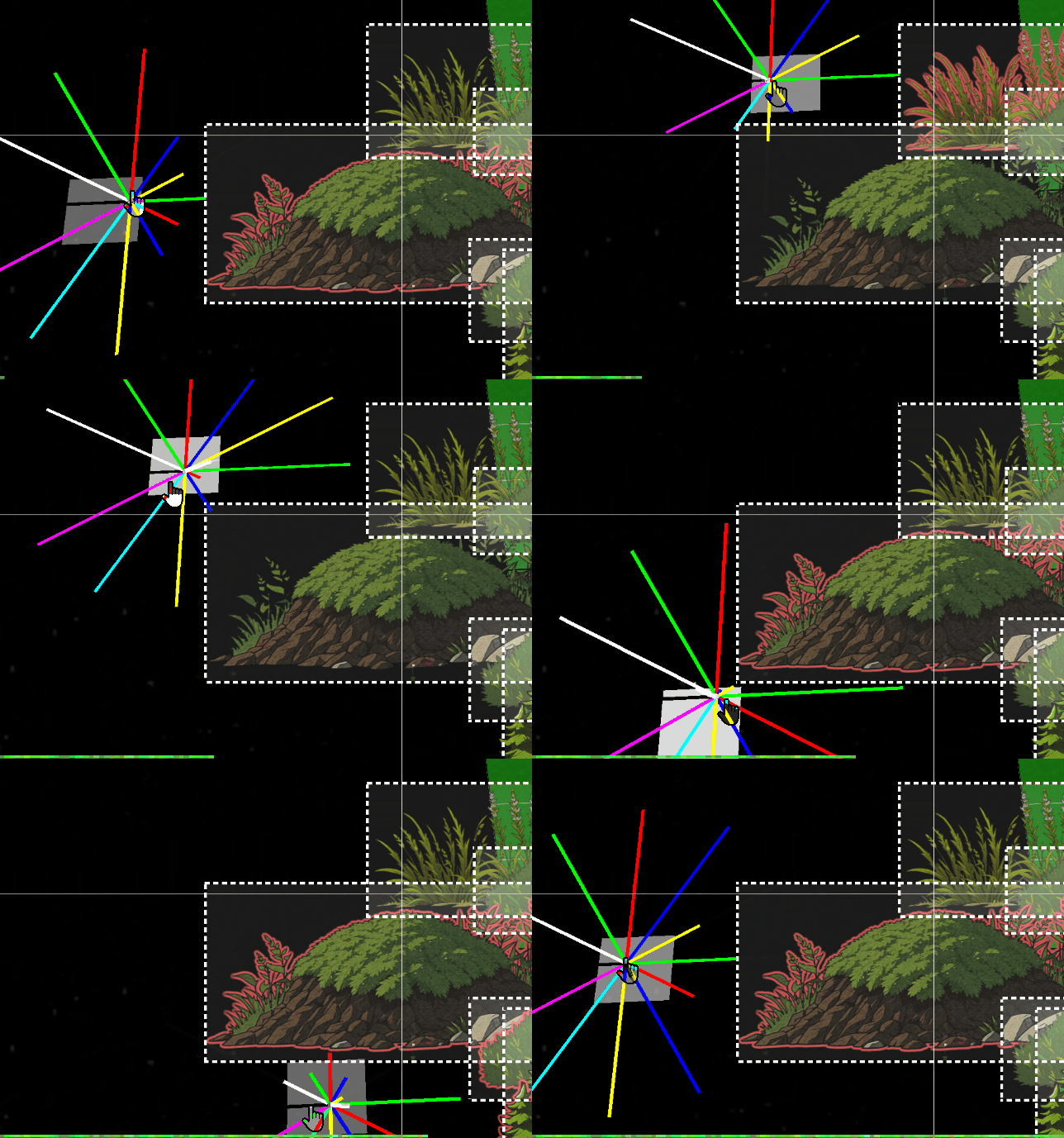
PixiJS فقط مع bounds على شكل إسقاطات مستطيلة. على الرغم من أن هذا ليس مشكلة في الأبعاد الثنائية (2D)، إلا أن هذا النهج يظل محدودًا جدًا لاحتياجات اللعبة. تُظهر الصورة أعلاه سلوك raycast على bounds كائناتنا.المشكلة#
مع ذلك، في الأبعاد الثلاثية (3D)، يطرح هذا النهج مشكلة كبيرة. عندما يخضعDisplayObject لدوران، يظل bounds الخاص به مستطيلاً ثابتًا بسيطًا.هذا مثال:#
لذلك، كان علي أن أخصص عدة أيام لدراسة الرياضيات وعلم المثلثات لتطبيق هذه الميزة.
ستكون هذه الميزة ضرورية للسماح للممثل بإدراك بيئته والتفاعل مع الكائنات بناءً على مسافتها وارتفاعها. سيخدم هذا الـ
raycast أيضًا نظام FOW (Fog of War)، حيث يعرض أجزاء معينة من الخريطة والعناصر بناءً على التصادمات التي يكتشفها.إنه موضوع لا أتناوله إلا بإيجاز، لأنه معقد للغاية. ومع ذلك، آمل أن يلهمكم هذا المقال لمشروعكم الخاص.
التكاملات#
لتبسيط نهجي، أنشأتClass Helper ضمن هيكليتي. يتم تخزين هذه الـClass Helper في ملفات `.h.ts` وتُصدر حصريًا كائنات Pixi.tsexport class RayCasterHelper extends Container3d { public rays:Sprite3d[] = []; public raysVirtual:Graphics[] = []; public raysDistance:number[] = []; public boundsDebugs:Graphics[] = []; public raysTextDistance:Text3d[] = []; public rayLength:number = 900; public raySize:number = 12; public inCircleRadius:number = 10; public quadrans:number = 8; public shapes:CollisionShape[] = []; }
يقوم التهيئة ببناء عدد المقاطع المشار إليها في المعامل. في حالتي، quadrant مكون من 8 مقاطع كان أكثر من كافٍ. يسهل هذا التكوين أيضًا التصحيح (debugging)، لأنه يسمح بتعيين 8 ألوان مميزة لهذه المقاطع.
tspublic initialize( renderer:Renderer ) {
		this.clear();
		const colors = [0x00ff00, 0xff0000, 0x0000ff, 0xffff00, 0x00ffff, 0xff00ff, 0x333444, 0xffffff];
		for ( let i = 0, l = this.quadrans; i < l; i++ ) {
			const color = colors[i % colors.length];
			const edges = [
				new Point( this.inCircleRadius, 0 ),
				new Point( this.inCircleRadius + this.rayLength, 0 ),
			];
			const ray = new Graphics();
			ray.lineStyle( this.raySize, color, 1 );
			ray.moveTo( this.inCircleRadius, 1 );
			ray.drawPolygon( edges );
			ray.endFill();

			const raySprite = new Sprite3d( renderer.generateTexture( ray ) );
			this.rays.push( raySprite );
			this.shapes[i] = new CollisionShape( raySprite, edges );

			raySprite.proj.euler.z = ( Math.PI * 2 / this.quadrans ) * i;
			this.raysDistance.push( 0 );
تجدر الإشارة إلى إنشاء النقاط التي تعمل كمقاطع. عادةً، ستكون نقاط الأقطار فقط ضرورية، لأن المستطيل لا يحتوي على بقعة عمياء على محاوره الأفقية والعمودية. لذلك، من الممكن تجاهلها اعتمادًا على نسبة الـquadrant المئوية، مما يسمح بتخطي الأشعة العمودية والأفقية لتوليد مضلعات فقط على الأقطار.
tsfor ( let i = 0, l = this.quadrans; i < l; i++ ) {
			const color = colors[i % colors.length];

			// continue if is horizontal or vertical
			if( i % 2 === 0 ) continue;
			const edges = [...
تأتي بعد ذلك طريقة
intersect، التي تقبل فقط DisplayObject كمعاملات. نوفر لها جميع الـDisplayObject التي سيتعين على الـraycast التكرار عليها.tspublic intersects( worlds:Container3d[] ) { const { rays, quadrans, intersectedMap, intersectedObjectsMap, closestMap } = this; intersectedMap.clear(); intersectedObjectsMap.clear(); closestMap.clear(); for ( let i = 0, l = quadrans; i < l; i++ ) { const ray = rays[i]; const b1 = ray.getBounds( true, this._cacheRectangle1 ); for ( const object of worlds ) { const b2 = object.getBounds( true, this._cacheRectangle2 ); const intersect = intersects( b1, b2 ); if ( intersect ) { const rayshape = this.shapes[i]; if ( rayshape.intersectsShape( b2 ) ) { intersectedMap.set( i, ( intersectedMap.get( i ) ?? [] ).concat( object ) ); intersectedObjectsMap.set( object, ( intersectedObjectsMap.get( object ) ?? [] ).concat( i ) ); } } } }
كان علي أيضًا تكييف دالة من
PixiJS للكشف عن التقاطعات وجمع بيانات إضافية. يتم عرض الكود أدناه، ولا يختلف بشكل كبير عن الطريقة الأصلية.ts/** return the intersection between two rectangles if any */ function intersects( source:Rectangle, other:Rectangle ) { let x0_1 = source.x < other.x ? other.x : source.x; let x1_1 = source.right > other.right ? other.right : source.right; if ( x1_1 <= x0_1 ) { return null; } let y0_1 = source.y < other.y ? other.y : source.y; let y1_1 = source.bottom > other.bottom ? other.bottom : source.bottom; if ( y1_1 <= y0_1 ) { return null; } // Compute the intersection distance const dx = x0_1 - x1_1; const dy = y0_1 - y1_1; const distance = Math.sqrt( dx * dx + dy * dy ); // Return the intersection details return { x: x0_1, y: y0_1, x2: x1_1, width: x1_1 - x0_1, height: y1_1 - y0_1, distance: distance, inRatioXY: Math.abs( dx / dy ), }; }
أخيرًا، بمجرد أن يكتشف
Pixi التقاطعات بين كائنين، من الممكن تحسين الكشف المحلي للتحقق مما إذا كانت مقاطعنا القطرية تلامس الكائنات.مذكرة التحسين:#
تستخدم كائنات البيئةbounds مربعة كلاسيكية. في الواقع، مع آلاف الكيانات، سيؤدي كشف التصادمات استنادًا إلى جميع المقاطع بدون بنية محسنة إلى مشاكل أداء خطيرة للغاية. من المحتمل أن يكون من الأفضل استخدام web workers أو shaders لتحسين هذا النوع من الحساب، بدلاً من تركه لـCPU.لهذا السبب، ستتعامل أقطار الـ
DisplayObject الـraycaster فقط مع كشف التصادم المضلعي، مما يوفر زيادة في الدقة بنسبة 50%. لتحقيق دقة 100%، يجب أن تكون كائنات البيئة أيضًا مضلعات، وهو ليس ضروريًا لمحركي الحالي. باستثناء ربما الأسوار القطرية، التي قد تشكل مشكلة محتملة... سيخبرنا المستقبل.يجب على طريقة
IntersectsShape هذه أن تكرر على كل نقطة من نقاط vertex للتحقق مما إذا كانت هذه النقاط تقع داخل bounds الـDisplayObject.tsintersectsShape( rec:Rectangle ) { const edges = this.edges; for ( let i = 0; i < edges.length; i++ ) { const edge = edges[i]; const point = edge.intersectsRectangle( rec ); if ( point ) { return true; } } return false; } class Segment { public p1: Point; public p2: Point; constructor( p1 = new Point(), p2 = new Point() ) { this.p1 = p1; this.p2 = p2; } intersects( edge: Segment, asSegment = true, point = new Point() ) { const a = this.p1; const b = this.p2; const e = edge.p1; const f = edge.p2; const a1 = b.y - a.y; const a2 = f.y - e.y; const b1 = a.x - b.x; const b2 = e.x - f.x; const c1 = ( b.x * a.y ) - ( a.x * b.y ); const c2 = ( f.x * e.y ) - ( e.x * f.y ); const denom = ( a1 * b2 ) - ( a2 * b1 ); if ( denom === 0 ) { return null; } point.x = ( ( b1 * c2 ) - ( b2 * c1 ) ) / denom; point.y = ( ( a2 * c1 ) - ( a1 * c2 ) ) / denom; if ( asSegment ) { const uc = ( ( f.y - e.y ) * ( b.x - a.x ) - ( f.x - e.x ) * ( b.y - a.y ) ); const ua = ( ( ( f.x - e.x ) * ( a.y - e.y ) ) - ( f.y - e.y ) * ( a.x - e.x ) ) / uc; const ub = ( ( ( b.x - a.x ) * ( a.y - e.y ) ) - ( ( b.y - a.y ) * ( a.x - e.x ) ) ) / uc; if ( ua >= 0 && ua <= 1 && ub >= 0 && ub <= 1 ) { return point; } else { return null; } } return point; } intersectsRectangle( rect: Rectangle ) { const rectEdges = [ //TODO: will need optimize with a cache pool of points new Segment( new Point( rect.left, rect.top ), new Point( rect.right, rect.top ) ), new Segment( new Point( rect.right, rect.top ), new Point( rect.right, rect.bottom ) ), new Segment( new Point( rect.right, rect.bottom ), new Point( rect.left, rect.bottom ) ), new Segment( new Point( rect.left, rect.bottom ), new Point( rect.left, rect.top ) ) ]; for ( const rectEdge of rectEdges ) { if ( this.intersects( rectEdge, true ) ) { return true; } } return false; } }
النتيجة النهائية#
طريقة
segmentIntersects هي حيث تُجرى الحسابات الأكثر تعقيدًا. استغرق مني يومين من العمل المكثف لجعلها تعمل، لكن النتيجة مرضية للغاية. كما يمكن ملاحظته في هذا الـgif، يمكنني الآن التفاعل مع بيئتي وربطها بعلامات ومعلومات بفضل الـRaycasting.توفر هذه الأداة البسيطة العديد من الميزات المثيرة للاهتمام لاستغلالها.